• Patients
    • What is FES
    • Who it can help
    • Treatment Options
    • Referral Options
    • Treatment pathway – UK
    • Clinics
    • PD Warrior Classes
    • Research/Evidence
    • Testimonials
    • NHS Funding
    • Information Pack
    • FAQ
  • Healthcare Professionals
    • What is FES
    • Who it can help
    • Treatment Options
    • Referral options
    • Training courses
    • FES Clinician Forum
    • Forms
    • Treatment pathway – UK
    • Research/Evidence
    • Knowledge Base
    • NHS Funding
    • Become a FES Practitioner
    • Information Pack
    • FAQ
  • Products
    • Stimulators
    • Electrodes
    • Electrode leads
    • Footswitches
    • Footswitch leads
    • Insoles
    • Accessories
    • Batteries
    • Constraint Mitten (CMIT)
  • Support for Patients
  • Contact

!Please Note: OML offices will be closed from 1pm on Wednesday 24th December. For emergency clinical support over the Christmas break please call 01722 439540. Offices will reopen on Mon 5th January

+
!
  • About
  • Community
  • Patients
    • What is FES
    • Who it can help
    • Treatment Options
    • Referral Options
    • Treatment pathway – UK
    • Clinics
    • PD Warrior Classes
    • Research/Evidence
    • Testimonials
    • NHS Funding
    • Information Pack
    • FAQ
  • Healthcare Professionals
    • What is FES
    • Who it can help
    • Treatment Options
    • Referral options
    • Training courses
    • FES Clinician Forum
    • Forms
    • Treatment pathway – UK
    • Research/Evidence
    • Knowledge Base
    • NHS Funding
    • Become a FES Practitioner
    • Information Pack
    • FAQ
  • Products
    • Stimulators
    • Electrodes
    • Electrode leads
    • Footswitches
    • Footswitch leads
    • Insoles
    • Accessories
    • Batteries
    • Constraint Mitten (CMIT)
  • Support for Patients
  • Contact

Odstock Medical

Support for Patients

Home > Support for Patients

Please see below for further support for FES users:

How to videos:

1. Turn Pace on and off

2. How to look after your FES electrodes

3. Joining OML Linq and Pace XL

4. Set up OML Linq footswitch

5. Set up Pace with 1 hand

Skin and Electrode care:

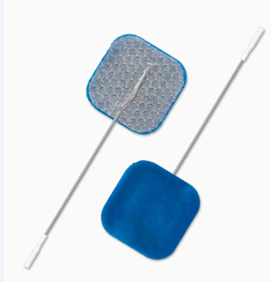
The manufacturer claims that the electrodes are good for about 30 applications. So using the stimulator every day means you should get about 1 month’s use.

Skin-and-Electrode-Care-for-FES-users.pdf (odstockmedical.com)

Skin-Irritation-Advice-for-FES-users-v1.pdf (odstockmedical.com)

How to care for your electrodes (youtube.com)

Electrode positioning:

The manual that comes with your stimulator may have diagrams of electrode positions.

Your clinician may have marked your electrode position in the manual or even issued you with photos of where your electrodes go.

If you continue to have problems, we recommend you contact the clinician that issued you with the equipment as they will be able to help.

Electrode Positions for drop foot and knee bend (popliteal fossa) (youtube.com)

Alternative electrode positions for foot drop (tibialis anterior motor point) (youtube.com)

Standard electrode positions for FES foot drop (youtube.com)

Repairs:

For OML patients

  1. Visit links above and OML youtube channel For Functional Electrical Stimulation (FES) Users to access how to guides for common FES device and electrode issues
  2. Contact OML customers services on sales@odstockmedical.com or 01722 439 540 option 1 who can help with diagnosis of most common faults. They will advise on next steps as some repairs can follow a different pathway (O2CHSII (dual channel), but majority follow the below steps.
  3. A replacement device will be posted to you adjusted to your settings.
  4. Once you have received your replacement device, please send the faulty device into OML for repair (please do not send device into OML before speaking with our customer services team)

For non OML patients:

Please contact your FES clinician.
Re-order products/consumables:

Please contact customer services on 01722 439 540 option 1 or sales@odstockmedical.com.

You can also view all our products at https://odstockmedical.com/products/

Further Frequently Asked Questions (FAQs)

FAQ | Odstock Medical

More videos about FES

For Functional Electrical Stimulation (FES) Users – YouTube

How to connect Pace XL with Linq and Remote

  • Odstock Medical Ltd.
    The National Clinical FES Centre
    Salisbury District Hospital
    Salisbury, Wiltshire SP2 8BJ
  • +44 (0)1722 439 540
  • enquiries@odstockmedical.com
  • Twitter Icon

Our Opening Hours

Mon - Fri: 9am - 5pm Sat - Sun: Closed

Newsletter Signup

For Healthcare professionals to stay in the know with what Odstock Medical Ltd is doing!

Signup Today

About Odstock Medical Ltd

  • Who we help
  • How we help
  • History
  • Meet the team
  • Job opportunities
  • Contact

Help & Information

  • Patients
  • Healthcare Professionals
  • FES Products
  • Knowledge Base
  • International
  • Community
  • Accessibility

© 2025 Odstock Medical|Website by blue bee

  • Terms of use
  • Privacy Notice
  • Conflict Minerals Statement
  • Modern Slavery Statement
  • Carbon Reduction Plan 2024
  • Safeguarding Policy
  • Quality Policy

Manage Consent
To provide the best experiences, we use technologies like cookies to store and/or access device information. Consenting to these technologies will allow us to process data such as browsing behaviour or unique IDs on this site. Not consenting or withdrawing consent, may adversely affect certain features and functions.
Functional Always active
The technical storage or access is strictly necessary for the legitimate purpose of enabling the use of a specific service explicitly requested by the subscriber or user, or for the sole purpose of carrying out the transmission of a communication over an electronic communications network.
Preferences
The technical storage or access is necessary for the legitimate purpose of storing preferences that are not requested by the subscriber or user.
Statistics
The technical storage or access that is used exclusively for statistical purposes. The technical storage or access that is used exclusively for anonymous statistical purposes. Without a subpoena, voluntary compliance on the part of your Internet Service Provider, or additional records from a third party, information stored or retrieved for this purpose alone cannot usually be used to identify you.
Marketing
The technical storage or access is required to create user profiles to send advertising, or to track the user on a website or across several websites for similar marketing purposes.
  • Manage options
  • Manage services
  • Manage {vendor_count} vendors
  • Read more about these purposes
View preferences
  • {title}
  • {title}
  • {title}
Manage Consent
To provide the best experiences, we use technologies like cookies to store and/or access device information. Consenting to these technologies will allow us to process data such as browsing behaviour or unique IDs on this site. Not consenting or withdrawing consent, may adversely affect certain features and functions.
Functional Always active
The technical storage or access is strictly necessary for the legitimate purpose of enabling the use of a specific service explicitly requested by the subscriber or user, or for the sole purpose of carrying out the transmission of a communication over an electronic communications network.
Preferences
The technical storage or access is necessary for the legitimate purpose of storing preferences that are not requested by the subscriber or user.
Statistics
The technical storage or access that is used exclusively for statistical purposes. The technical storage or access that is used exclusively for anonymous statistical purposes. Without a subpoena, voluntary compliance on the part of your Internet Service Provider, or additional records from a third party, information stored or retrieved for this purpose alone cannot usually be used to identify you.
Marketing
The technical storage or access is required to create user profiles to send advertising, or to track the user on a website or across several websites for similar marketing purposes.
  • Manage options
  • Manage services
  • Manage {vendor_count} vendors
  • Read more about these purposes
View preferences
  • {title}
  • {title}
  • {title}